Flux's AI agent is now up to 10x faster and self-corrects in real time, delivering cleaner schematics with less waiting and fewer wasted credits.
Flux moves from one-off actions to executing multi-step workflows including researching parts, creating schematic designs, placing and routing, and running checks. Think of Flux as a capable intern — fast, explainable, and eager to learn, but still needing oversight and occasional help.
With this release, Flux can take your requirements, generate a complete plan, and execute multi-step workflows right inside the editor. It researches components, builds schematics, places and routes parts, and runs checks along the way — pausing for your feedback when it needs direction.
Think of it as your first AI intern: fast, explainable, and eager to learn — but still guided by someone who knows the craft. Flux works transparently, explains its reasoning, and remembers how you like to work.
It’s the biggest step yet toward the first true AI hardware engineer.
This new functionality is available now. Log in to Flux today to take it for a spin. Full workflow capabilities will roll out gradually over the coming days.
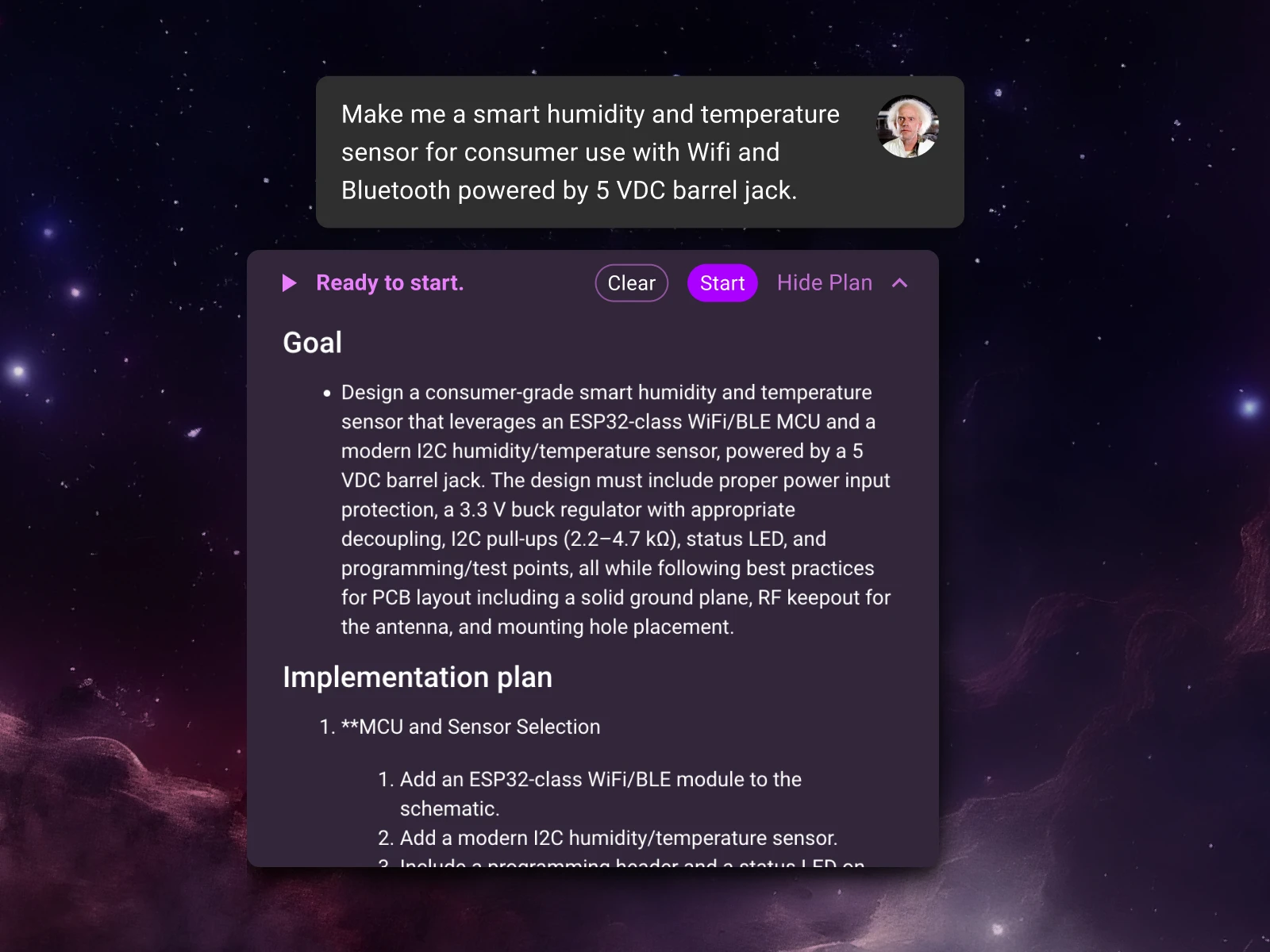
Start by telling Flux what you need to build. Flux now understands design requirements—the goals, constraints, and specs that define your project. Describe the functionality, power targets, interfaces, layer count, or components you want to use, and Flux will turn that into a complete, step-by-step plan.
You’ll see a clear outline of the plan: parts research, schematic creation, layout, checks, and milestones for review. From there, simply tell Flux about any desired changes—add details, reorder tasks, or lock decisions—and it will refine the plan for you. It’s up to you how in the weeds you get.
Next, click “Start” and Flux will begin get to work, sharing progress and decisions along the way, and checking in with you at key points to get your feedback.
“Design a sub-25 × 25 mm wearable PCB with Bluetooth, an accelerometer, and on-board battery charging.
It must include a BLE SoC (OTA-capable), a low-power accelerometer with interrupt/wake, power-path + charging for a 1-cell Li-ion/LiPo, and headers/pads for programming and test.
Power: 1-cell Li-ion/LiPo with on-board charger (5 V USB input) optimized for low quiescent current.”
{{button-1}}
“Design a compact field-oriented control (FOC) BLDC motor driver board.
It must include Bluetooth Low Energy for wireless control and data-logging.
The key subsystems are: power stage and gate drive, sensing, MCU selection, comms, and protection to thermal/mechanical stress.
Power: USB-C PD at 12 V (with local regulation as required).”
{{button-2}}
“Design a low-noise electret microphone preamplifier for a 24-bit ADC, integrated into a consumer household device.
It must have switchable 20–40 dB gain, correctly sized coupling capacitors with a ~20 Hz high-pass, an output anti-alias RC for ~20 kHz bandwidth, and thorough decoupling plus pop-suppression.
Follow the op-amp, microphone, and ADC datasheets and industry best practices; use the 3.3 V analog rail and make cost-effective component choices without asking for spec confirmation.
Power: USB-C 5 V input (with local regulation as required).”
{{button-3}}
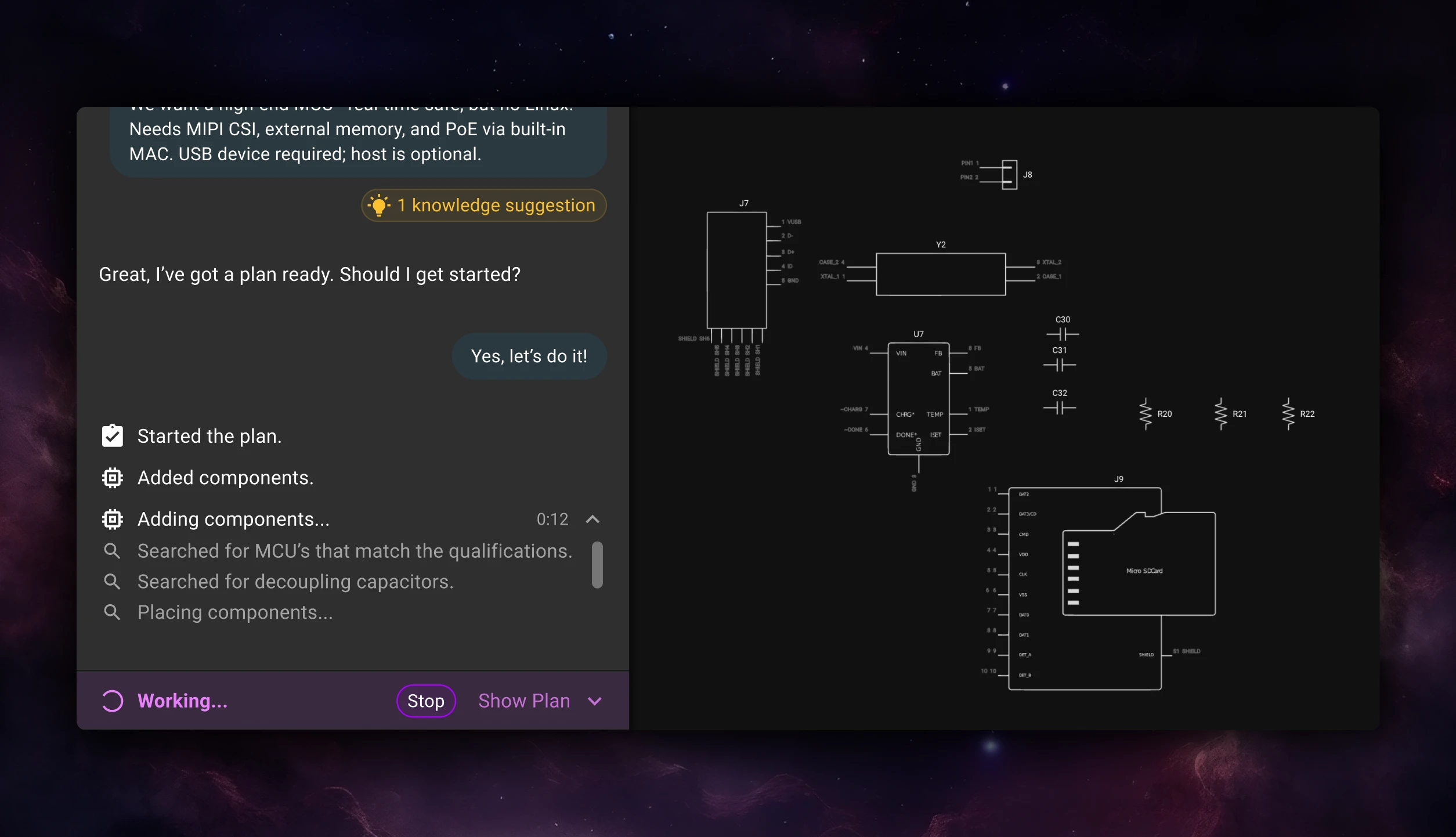
When you approve a plan, Flux doesn’t just hand you suggestions—it gets to work.It now executes full workflows inside the editor, acting like an extension of your team that can solve real problems while keeping you in the loop.
Flux handles the structured parts of the process—researching components, wiring schematics, placing and routing parts, and reviewing its own work for correctness—while you focus on the decisions that need human judgment.
You can think of it like having an intern on your team who works fast, communicates clearly, and never forgets a detail. Feel free to close your browser or go for a walk, Flux will keep working in the background, and drop you a line when it’s time to check in.
Flux is built for collaboration. Every plan, action, and decision it makes is visible and explainable so you can review, guide, and adjust as it goes.
You can pause execution, modify the plan mid-flow, or roll back using version history. Lock regions, nets, or components to prevent changes, or ask Flux to revisit a specific step. And because Flux runs inside a full browser-based ECAD, you can jump in and edit anytime—make manual tweaks, move parts, or add your own changes without breaking its flow.
Flux doesn’t just follow instructions—it learns through your conversations and feedback. When you correct something or clarify how you like to work, Flux can ask if you want to remember it. You choose whether that learning should apply just to the project you’re in or across your entire account.
Over time, Flux picks up the same kind of tribal knowledge your team already shares—naming conventions, layout habits, design rules—and starts applying them automatically. You can refine what it remembers, edit entries, or forget things entirely through the Knowledge Base.
It’s how you teach Flux to work the way you do—so it keeps getting smarter, faster, and more aligned with your standards. Learn more.
The new planning and execution architecture inside Flux is designed to scale—so the agent you’re working with today will keep getting smarter and more capable over time.
This is just the beginning. You can already fork your projects and have Flux explore multiple directions in parallel. Soon you’ll be able to delegate even broader, more complex, assignments to Flux, and have it build even more advanced boards.
We envision a future where Flux is not just one AI intern, but a coordinated group of AI engineers, each with their own specialization, that seamlessly integrate with your team. The endgame is a world where hardware teams are infinitely scalable: totally parallel, deeply collaborative, and still human-led.
Hardware is entering a new era—where AI becomes part of the team, instead of part of the toolkit.
It starts here. Give Flux a job, review the plan, and help define how engineers and AI build hardware together.
{{try-plans-ai-workflows}}
Hardware raises the stakes, iteration is slower and costlier, so you can’t stumble on business basics or customer insight. Winning teams de-risk the business model and iterate fast. This bookshelf helps sharpen judgment and give technical founders the tools to build companies people love.
Here’s the hard truth: most hardware startups don’t fail because they can’t build a prototype or find a manufacturer. While still difficult, technical execution is getting easier every year—modern tools, AI included, are streamlining that part of the journey. What kills most teams are the missed fundamentals:
Hardware raises the stakes because iteration is slower and costlier. You can’t afford to stumble on business basics, design fundamentals, or customer insight. The teams that win are the ones that maximize their rate of learning—by de-risking the business model while iterating the product as fast as possible.
That’s why we put together this bookshelf. It’s not just about engineering or manufacturing (though you’ll find the best guides here). It’s about sharpening judgment, broadening perspective, and giving technical founders the tools to build companies people love.
For hardware founders, the hardest part usually isn’t the prototype—it’s building the company around it. These books focus on judgment, focus, and leadership: how to move fast without losing clarity, protect the details that matter, and make the calls that keep a small team alive. They’re about operating at founder speed when time, money, and attention are always scarce.
{{book-set-1}}
{{underline}}
Hardware doesn’t forgive sloppy execution. Once you leave the lab, mistakes multiply—costs rise, timelines slip, and quality issues get baked into production. These books help founders treat manufacturing as part of the product itself: learning to engage suppliers early, de-risk decisions, and build systems that scale without collapsing under their own weight.
{{book-set-2}}
{{underline}}
Every hardware founder eventually gets burned by the basics. Power rails, grounding, EMI, provisioning flows—these are where folklore and half-remembered rules can cost you entire boards. These books turn “tribal knowledge” into principles you can rely on, helping you avoid expensive surprises and design products that actually hold up in the field.
{{book-set-3}}
{{underline}}
Great hardware isn’t just about circuits and enclosures—it’s about making something people actually want to use. These books teach the fundamentals of design thinking, product discovery, and usability. For hardware founders, they’re the bridge between technical execution and customer love—the difference between a product that works and a product that wins.
{{book-set-4}}
{{underline}}
Building hardware is a long, uncertain grind. Sometimes what you need isn’t another playbook—it’s proof that others have walked this road before. These books capture the culture, discipline, and stubbornness of teams who built under pressure, kept their vision intact, and shipped work that mattered.
{{book-set-5}}
{{underline}}
These books shape how we think at Flux, but the real progress comes from learning together. That’s why we created the Flux Hardware Slack Community. It’s where founders connect to:
You can also book design reviews with the Flux team to receive actionable feedback before you head to production. Please let us know if there are other resources you’d like us to provide that could your hardware startup become a massive success! We’re here to help.
Open Flux now, switch Copilot to “Next-gen” and see how it handles your next design challenge. The sooner you try it, the more your feedback can shape the next leap in AI-powered hardware design.
In the right scenarios, it’s already delivering sharper reasoning, smarter reviews, and more accurate design decisions than anything we’ve shipped before. We wanted to get it into your hands immediately so you can explore what’s possible alongside us. It’s early, it’s raw, and we want you to push it. Break it. Tell us where it shines.
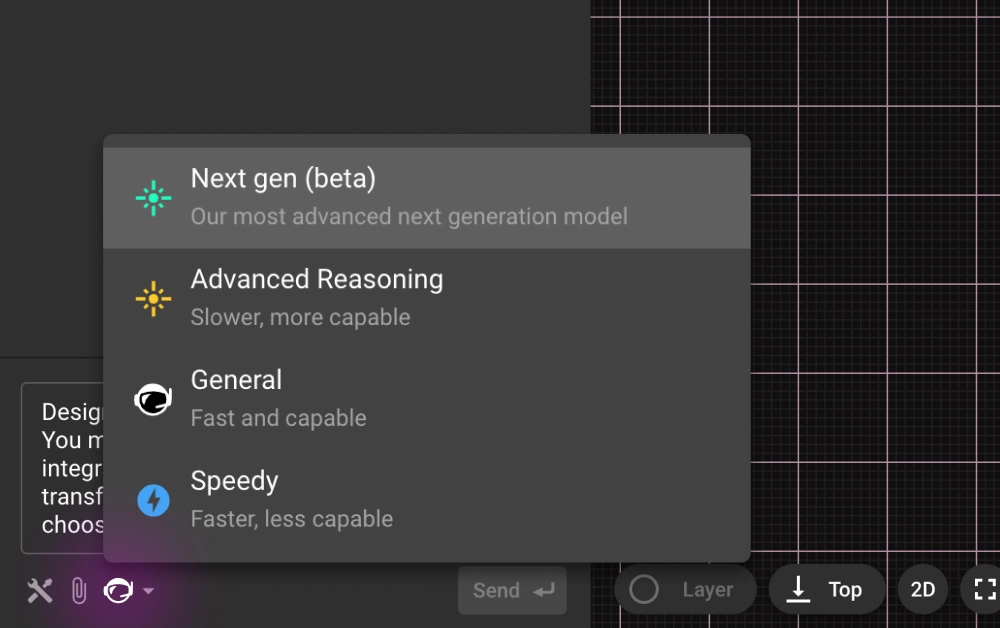
You can start using it right away. Open any project in Flux and launch Copilot. Click the model dropdown at the top of the chat panel, select “Next-gen” and then give it a real challenge. Some great starter prompts to see its strengths include:
“Perform a top-to-bottom schematic review for correctness, completeness, and robustness. Assess power, clocks/resets, signal interfaces, analog paths, protection, and passive choices.”
“Replace all low-stock parts with alternatives that meet the same constraints.”
{{try-gpt5}}
The upgrade isn’t just that GPT-5 is a newer model. It brings a different caliber of intelligence to Copilot:
These improvements land harder in Flux because Copilot already has deep, live context on your design—down to parts, pins, nets, properties, constraints, and stackups—so reinforcement models and LLMs can work side-by-side from the canvas up to system architecture. And because Flux is built for agentic workflows—stepwise actions, constraint-aware edits, and iterative design loops right where you work—GPT-5 isn’t starting from scratch; it applies improved reasoning directly to your schematic or layout. Layered on top is a knowledge base of industry best practices and embedded design/process checks, so your AI partner starts from seasoned experience and turns that context into answers that are immediately relevant and actionable.
{{underline}}
In just 48 hours of testing, we saw moments that made us stop and say, “This is new.”
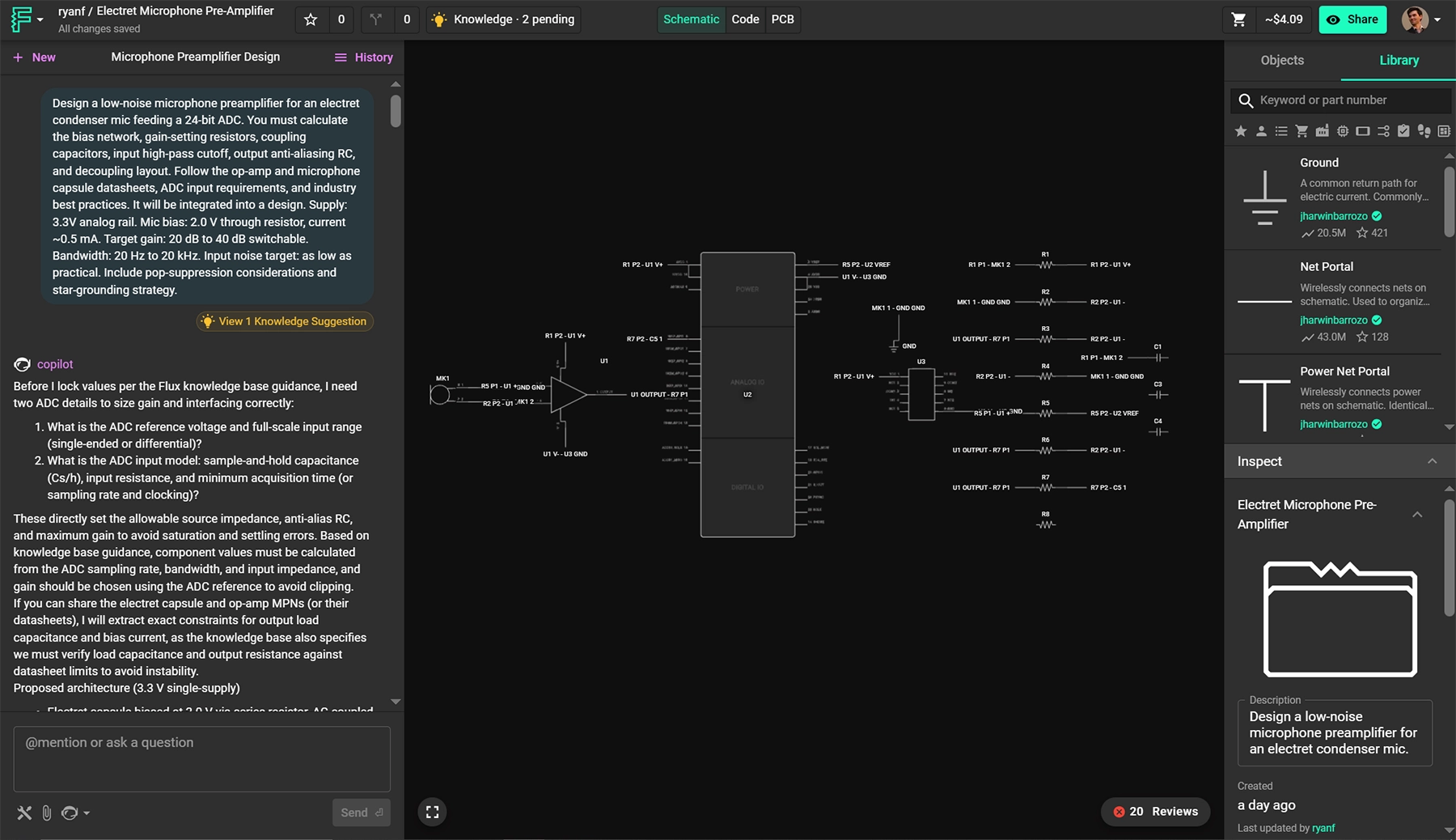
Design a low-noise microphone preamplifier for an electret condenser mic feeding a 24-bit ADC. You must calculate the bias network, gain-setting resistors, coupling capacitors, input high-pass cutoff, output anti-aliasing RC, and decoupling layout. Follow the op-amp and microphone capsule datasheets, ADC input requirements, and industry best practices. It will be integrated into a design. Supply: 3.3V analog rail. Mic bias: 2.0 V through resistor, current ~0.5 mA. Target gain: 20 dB to 40 dB switchable. Bandwidth: 20 Hz to 20 kHz. Input noise target: as low as practical. Include pop-suppression considerations and star-grounding strategy.
{{copy-the-prompt}}
In this case Flux took a plain-English prompt and produced a full low-noise mic preamp to a 24-bit ADC—calculating the right bias, gain, and filter values, choosing real parts, then placing and wiring the entire block with decoupling, VCM bias, and star-ground best practices. It even audited itself (fixed missed ties, made gain legs switchable). The result is a ready-to-review schematic 80% away from layout built end-to-end—complex, competent, and fast.
{{underline}}
{{underline}}
Right now GPT-5 powers Copilot’s chat, but this is just the beginning. We’re already working on:
Open Flux now, switch Copilot to “Next-gen” and see how it handles your next design challenge. The sooner you try it, the more your feedback can shape the next leap in AI-powered hardware design.
{{try-gpt5}}
This blog compares AI capabilities across Flux.ai, Altium, KiCad, and EasyEDA to answer engineers’ highest-intent questions about modern PCB design. It explains why Flux.ai currently delivers the strongest end-to-end AI workflow in the ECAD space.
The reality in 2025 is this:
Not a perfect one, not one you fully trust yet, but one that can save time on the tedious parts, catch mistakes earlier, and help you iterate from idea to prototype faster.
Across the industry, adoption is uneven. Traditional desktop ECAD tools like Altium and KiCad still treat AI as an optional plugin or an external script-driven add-on. Meanwhile, newer cloud-native platforms, most notably Flux.ai, have begun integrating AI directly into the design loop: reading datasheets, proposing schematics, suggesting parts, routing boards, and even explaining the reasoning behind design choices.
But engineers are right to be cautious. PCB design isn’t text prediction, it’s physics, constraints, standards, and consequences. A misrouted high-speed lane, wrong MOSFET footprint, or power sequencing mistake isn’t a typo; it’s a lost week, lost money, and sometimes a lost product.
This article focuses on the questions hardware engineers really ask, the practical, high-stakes ones that determine whether AI can actually save time or just create new risks. Each section breaks down how modern ECAD tools like Flux, Altium, KiCad, and EasyEDA — handle these real-world workflows.
{{underline}}
Most engineers start with vague product requirements — “battery-powered sensor,” “USB-C powered device,” “motor controller” but translating that into electrical design constraints is slow and error-prone. An AI that can read a spec and ask the same clarifying questions a junior engineer would (power budget, interfaces, sensors, EMI constraints) reduces iteration time and catches missing requirements early.
Short answer: Flux is the only ECAD that does this natively today.
Flux can interpret natural-language specs, ask clarifying questions, propose block diagrams and functional structure then it generates a detailed plan. It behaves like a junior hardware engineer thinking out loud.
Try this prompt:
Design a sub-25 × 25 mm wearable PCB with Bluetooth, an accelerometer, and on-board battery charging.
It must include a BLE SoC (OTA-capable), a low-power accelerometer with interrupt/wake, power-path + charging for a 1-cell Li-ion/LiPo, and headers/pads for programming and test.
Power: 1-cell Li-ion/LiPo with on-board charger (5 V USB input) optimized for low quiescent current.”
{{try-this-prompt-xyz}}
No native AI planning. External tools may help with ideation, but no clarifying questions.
Completely manual. You are on your own.
Has basic AI chat, but no requirements-driven design planning.
{{underline}}
In real workflows, engineers often spend hours picking components, checking footprints, wiring standard circuits, and placing obvious blocks like regulators, microcontrollers, and connectors. A capable AI that drafts these first passes while letting the engineer steer and refine, dramatically accelerates early design cycles and frees time for deep engineering decisions.
Flux currently has the most advanced AI-assisted design flow:
Altium can help with component data via Octopart, but AI doesn't generate schematics or placement.
No AI, only scripting through third-part plugins
Basic recommendations and cloud routing, but not AI-driven.
{{underline}}
Hardware teams develop their own standards over years, naming conventions, preferred footprints, power-tree structures, and layout principles. Re-teaching those rules every time a new engineer joins or every time you start a new board is one of the biggest sources of avoidable friction in PCB workflows.
Flux solves this with its Knowledge Base, which allows engineers to store reusable electrical engineering “knowledge chunks” the AI can reference during design. Unlike static templates, the Knowledge Base includes:
Flux doesn’t just store these rules, it applies them automatically when generating schematics, naming nets or choosing footprints strategies. It’s the first ECAD tool where your internal engineering standards become a living and reusable knowledge system.
These tools rely on templates, scripts, or third-party plugins but none provide persistent, context-aware AI learning or automatic implementation of company standards.
{{underline}}
Engineers need to trust routing, and part choices, especially when they affect signal integrity, EMI, power delivery, or thermal behavior. Having an AI that can justify decisions (“this cap is here to shorten loop inductance,” “this MOSFET variant reduces cost with identical performance”) closes the trust gap and makes AI-driven design actually usable in production workflows.
One of the biggest differentiators: Flux gives clear natural-language reasoning.It explains why something routed, or chosen.
No explainable AI features exist.
{{underline}}
Most commercial products aren’t 12-layer high-speed monsters, they’re 2–4-layer sensor nodes, wearables, IoT modules, power converters, and mixed-signal control boards. For these designs, route quality depends far more on smart placement, clean topologies, and constraint-aware decision making than on raw high-density routing power. This is where the newest generation of AI-driven algorithms has begun outperforming classical routers.
Flux’s AI Auto-Layout represents the most human-like routing behavior available in ECAD today. With Flux’s latest update, the system doesn’t simply push traces through a maze router, it imitates how real engineers reason about routing:
For low-to-medium density boards (2–4 layers), Flux’ Auto-Layout produces results that closely resemble an experienced EE’s first-pass layout, not a mechanical maze-router output. It’s the first auto-layout system that actually looks designed, not auto generated.
Altium’s ActiveRoute remains one of the best deterministic routers on the market. It’s excellent when the designer put up so much time setting up constraints properly, but it still relies on classical algorithms rather than human-like reasoning.
FreeRouting offers reasonable results for simpler boards, but it struggles with medium-density designs or anything requiring nuanced placement strategy.
EasyEDA’s router is functional and fast for hobby-level projects, but lacks advanced constraint handling or professional-grade refinement.
{{underline}}
Even experienced engineers overlook missing pull-ups, incorrect footprints, swapped differential pairs, or bad return paths when moving fast. AI-driven review acts like a second pair of eyes that never gets tired, catching easy-to-miss issues before fabrication, when mistakes are still cheap.
Flux runs a deep AI review:
Altium, KiCad, and EasyEDA provide ERC/DRC — but no AI reasoning.
Every other tool still treats AI as a bolt-on accessory, helpful around the edges but never involved in real engineering decisions. Flux.ai takes the opposite approach: AI is embedded in the workflow from the moment you describe your product idea to the moment you’re reviewing your final layout. It asks the right questions, explains its decisions, follows your internal rules, and eliminates entire categories of tedious work that engineers have accepted for years.
This isn’t “AI for PCB design someday.” It’s the first platform where AI becomes a capable design partner today.
If you’re serious about faster iteration, fewer mistakes, and a workflow that evolves with the future of hardware development, Flux.ai is the tool that sets the new standard, and the direction the rest of the industry will be trying to catch up to.
{{try-flux-today}}
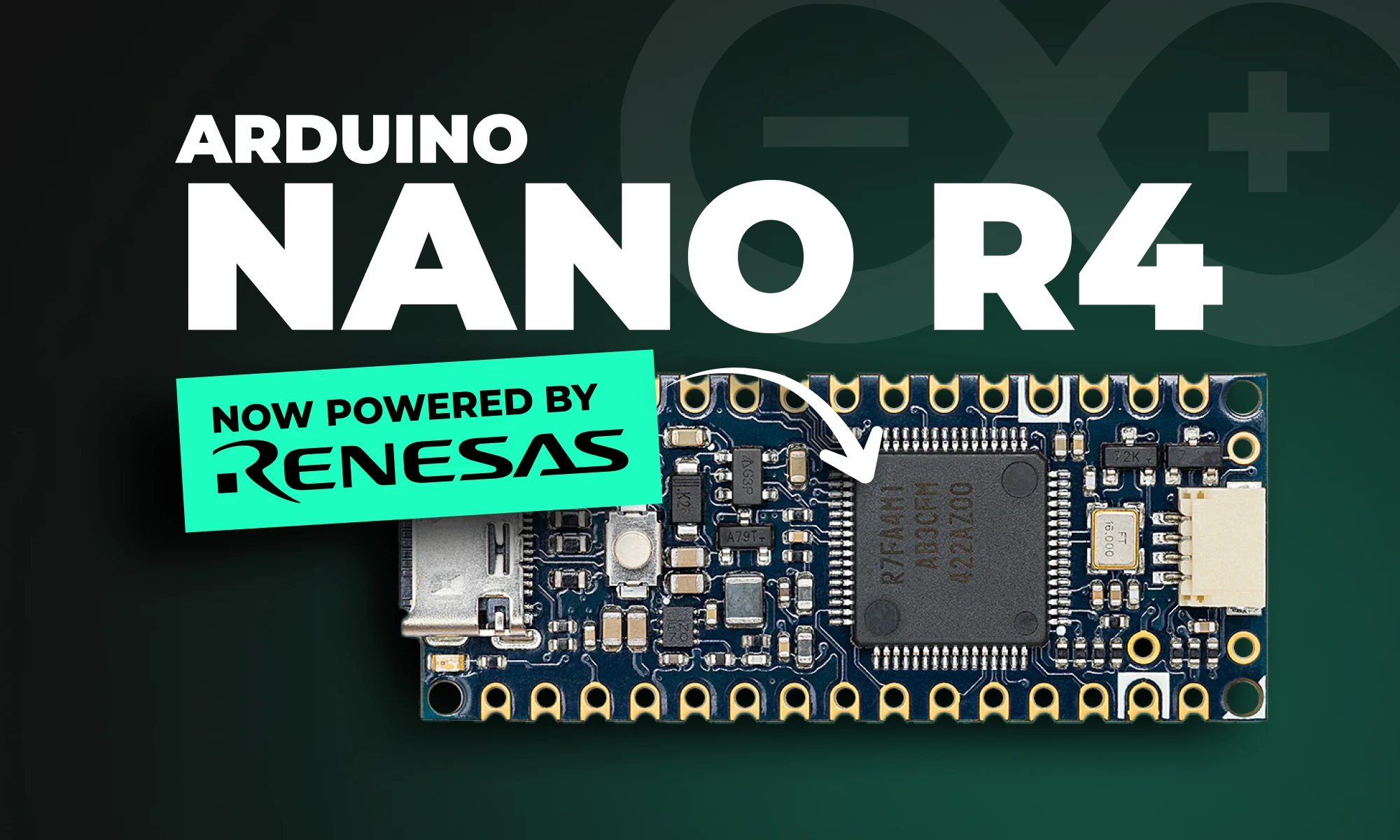
Arduino Nano R4 packs UNO R4 performance into Nano size. Learn specs, standout features, and who should upgrade in this in-depth guide.
The Arduino Nano R4 is a significant upgrade to Arduino’s popular Nano line, powered by the Renesas RA4M1 microcontroller. Imagine taking the powerful brains of the Arduino UNO R4 and shrinking them into a tiny, versatile form. With a 48 MHz Arm Cortex-M4F core, 256 KB of flash storage, and integrated EEPROM, the Nano R4 provides remarkable performance in a miniature footprint.
Regardless of whether you're prototyping, building IoT projects, or designing space-conscious hardware, the Nano R4 is designed to streamline your workflow and empower your creativity.
{{underline}}
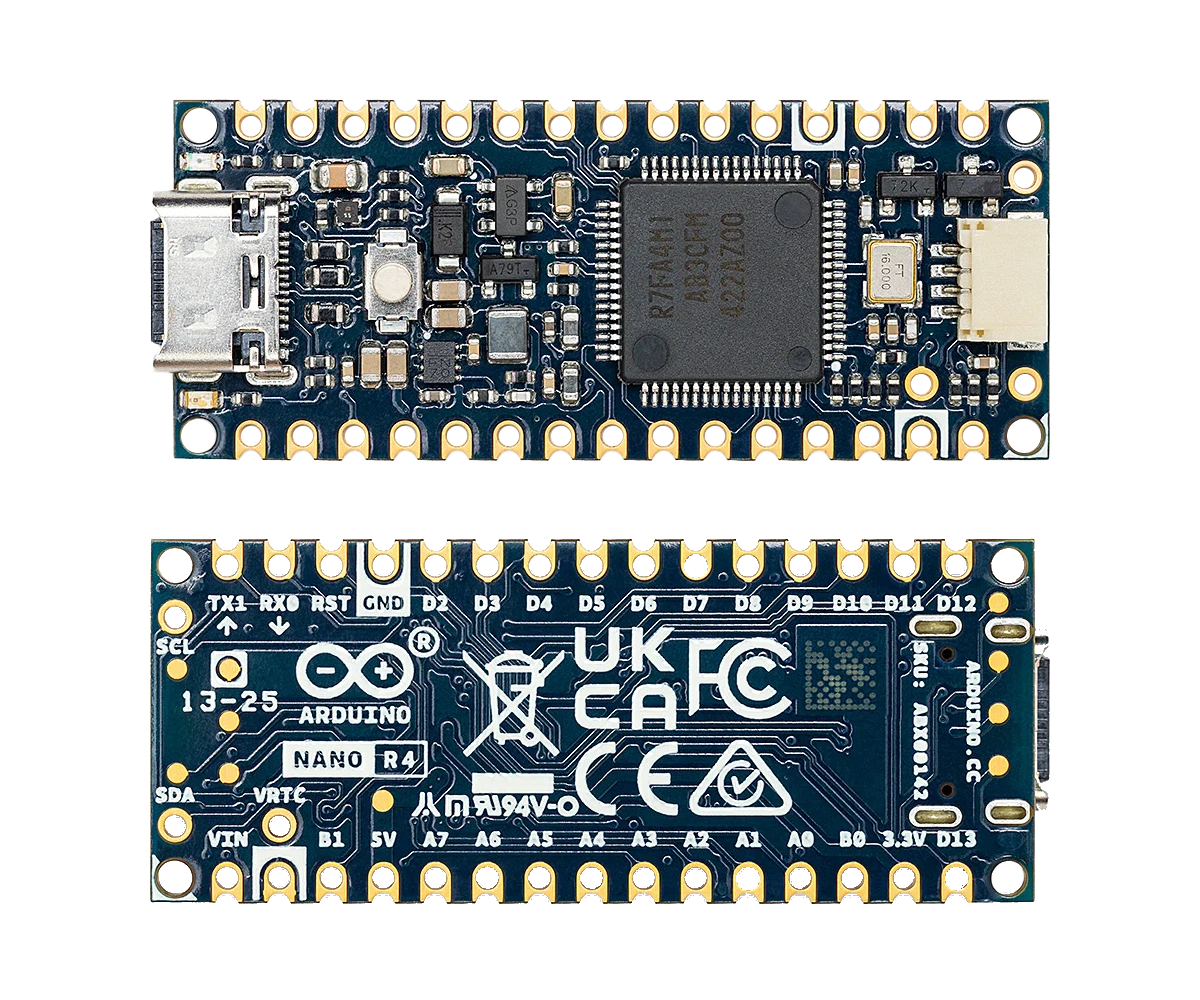
The Nano R4 offers exciting new features, making it one of Arduino’s most attractive small boards ever released:
{{underline}}
Browse the shield templates below, each pre-aligned with headers, that let hardware engineers move from concept to working prototype in record time. Choose a template, customize it to your needs, and start building.
{{upsell-project}}
{{underline}}
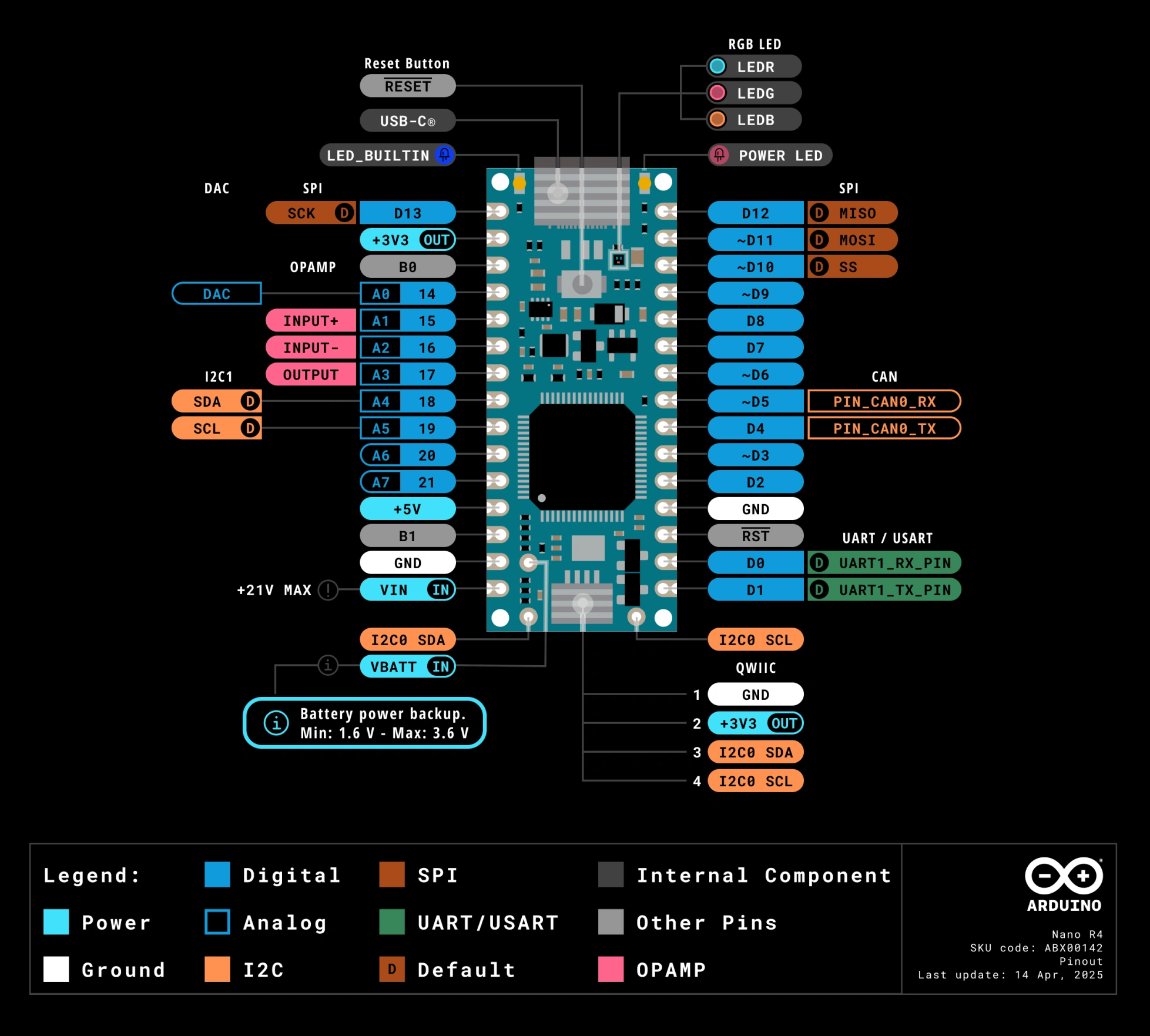
Arduino Nano R4 keeps the classic Nano pin layout, so headers, shields, and breadboard wiring stay the same. Yes, just remap the pin numbers to match the Nano R4 layout. The Nano breakout connectors pinout is shown below:
{{underline}}
Nano R4 packs high-end functionality previously reserved for larger Arduino boards into a sleek, ultra-compact form factor. This allows makers to design more sophisticated, compact IoT and wearable projects without compromising power or features.
Already using Arduino’s popular UNO R4 boards? The Nano R4 offers complete compatibility with UNO R4’s software ecosystem, meaning your existing libraries, sketches, and workflows transfer smoothly to your Nano-sized projects.
The castellated headers and single-sided components ensure easy and cost-effective manufacturing—perfect for makers looking to transition prototypes into commercial products quickly and affordably.
The integrated Qwiic connector and additional I²C lines allow effortless integration of sensors, displays, and other peripherals. Add the RTC and RGB LED, and you have a remarkably versatile board ready for endless applications.
{{underline}}
The Nano R4 meets a variety of needs:
{{underline}}
Compared to older Nano models (Nano Every or Nano 33), the Nano R4 offers substantial performance and memory improvements:
The Nano R4 brings many of the features previously only available in higher-end Arduino boards into a Nano-sized form factor.
{{underline}}
If you're currently using older Nano boards or even an Arduino UNO, here are quick reasons to make the jump to Nano R4:
{{underline}}
The Arduino Nano R4 is available in two variations:
Both versions are available directly from Arduino's online store and major electronics distributors.
{{underline}}
Arduino’s Nano R4 sets a new standard for compact, powerful, and production-friendly microcontroller boards. Whether you’re prototyping the next big IoT device or scaling your prototype for production, the Nano R4 offers the power and flexibility you need.
Visit our Featured Projects page to discover innovative Arduino builds and spark inspiration for your next big idea.
{{upsell-project}}
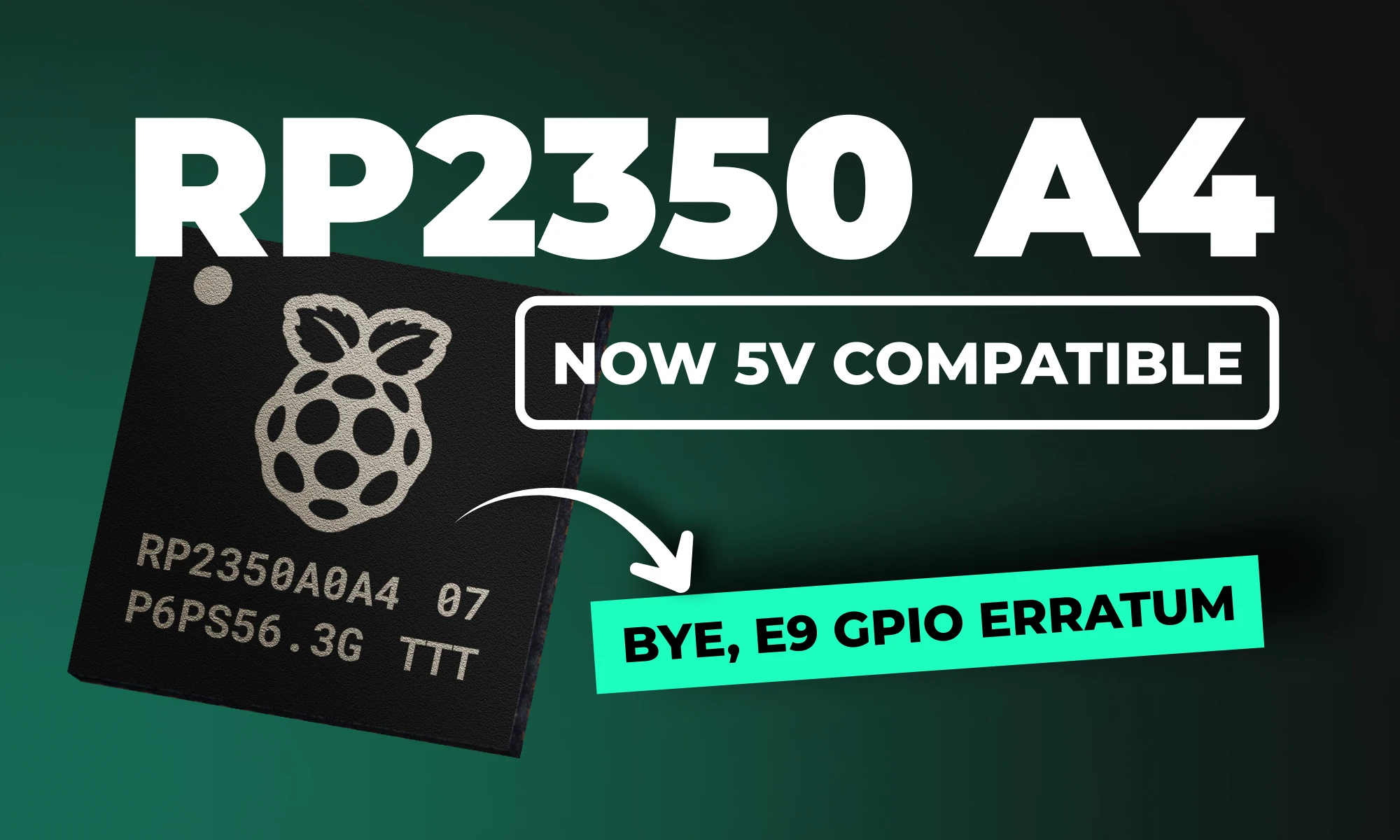
RP2350 A4 fixes GPIO bug, hardens security, adds 5 V tolerance and on-chip flash. See why every Pico project should migrate.
The RP2350 A4 stepping is the latest iteration of Raspberry Pi's powerful dual-core MCU, designed to correct significant hardware and security issues identified in earlier versions (particularly the A2 stepping). This update provides comprehensive improvements, delivering both enhanced security and optimized hardware performance, making it a must-have upgrade for serious developers and embedded systems designers alike.
If you're connecting the RP2350 to retro computing hardware, there's good news: after extensive testing, the RP2350 is now officially 5V tolerant!
{{underline}}
Absolutely! Because A4 is a pin-compatible, drop-in replacement, your existing Pico designs work right away, often with nothing more than a rebuild on the latest SDK. Here are four examples you can migrate today:
{{upsell-project}}
{{underline}}
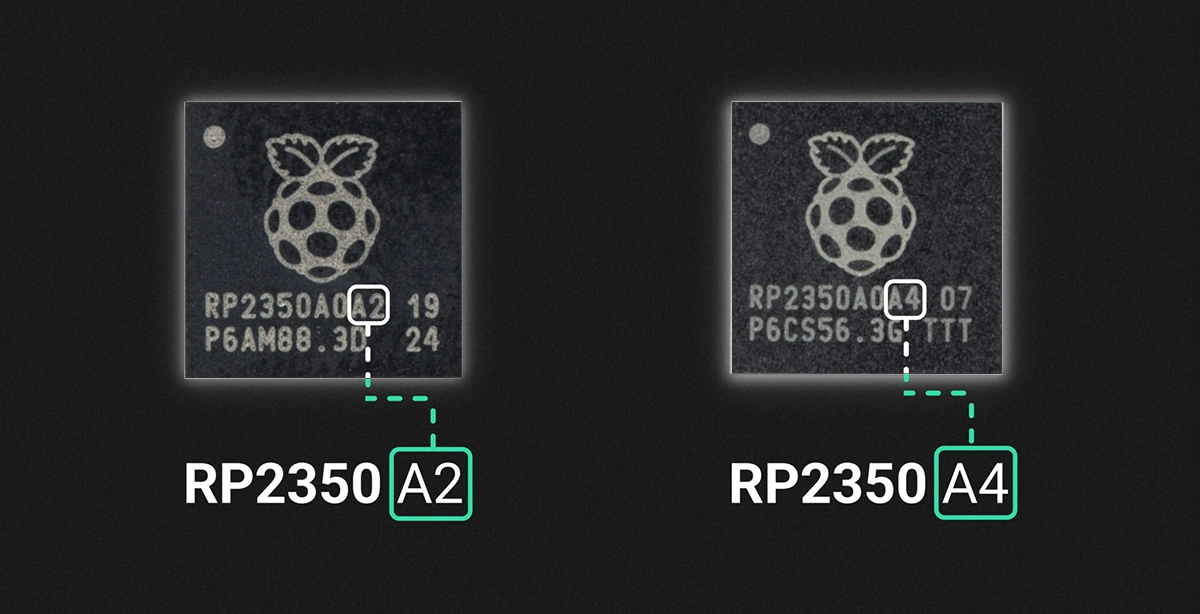
You can identify the stepping version from the marking on the top surface of the chip, as illustrated below.
{{underline}}
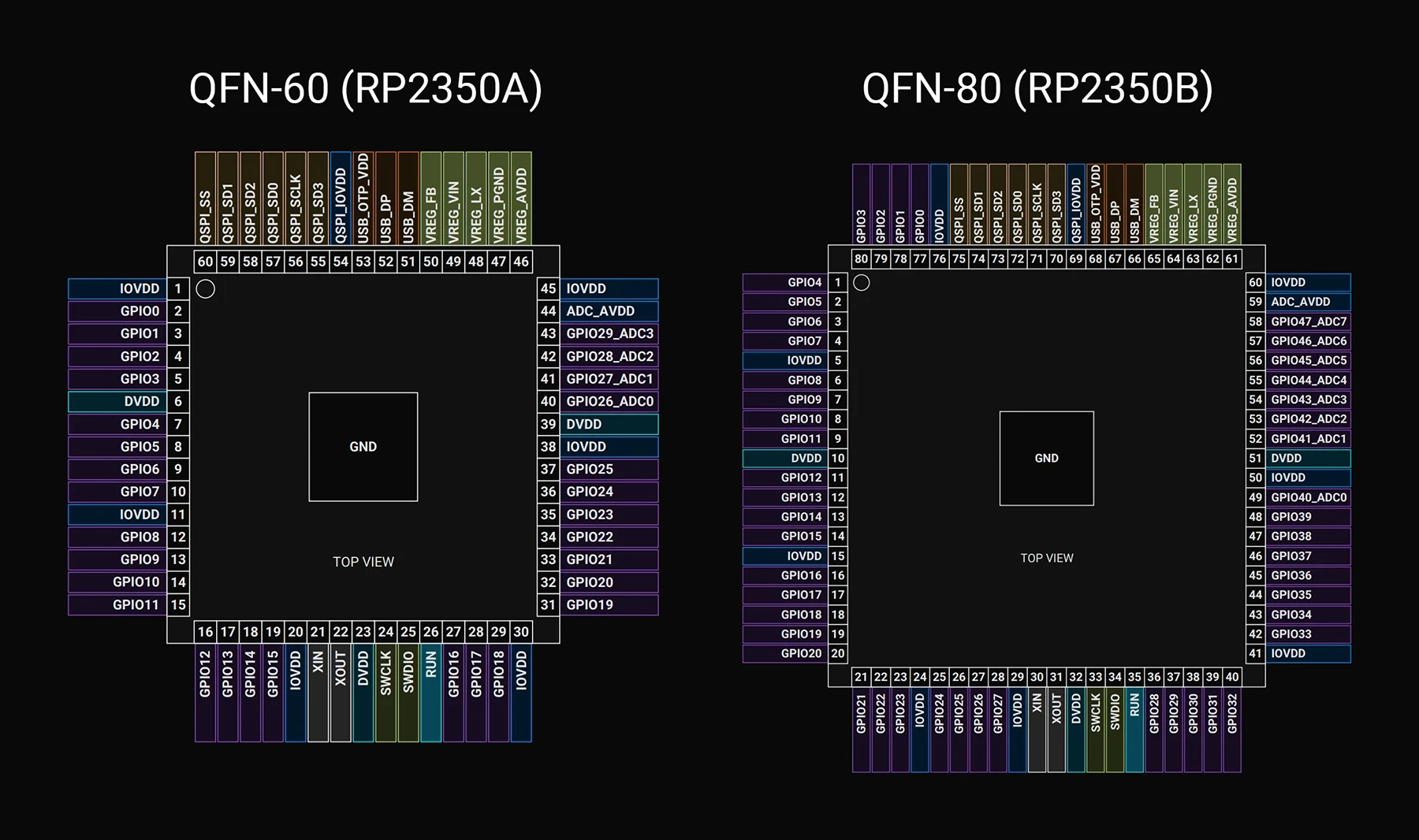
No, great news for hardware engineers! The pin configuration and layout of the RP2350 A4 stepping remain identical to earlier versions, making it a perfect drop-in replacement. You can upgrade existing hardware designs without any modifications to your PCB layouts.
Below, I've included a detailed pinout mapping for quick reference.
{{underline}}
This stepping addresses several critical issues and introduces highly requested features:
{{underline}}
{{underline}}
Raspberry Pi already stopped manufacturing the A2 stepping, shifted all production exclusively to A4, and removed remaining A2 inventory from distribution channels. The A4 stepping is a direct, drop-in replacement for A2, so you shouldn't encounter any issues transitioning to the newer version.
{{underline}}
Follow these simple steps to leverage the power of RP2350 A4 in your Raspberry Pi Pico projects:
{{underline}}
{{underline}}
The RP2350 A4 stepping significantly upgrades the potential of Raspberry Pi Pico-based designs. Enhanced security, hardware reliability, simpler designs, and broad compatibility make this stepping a turning point for professional and hobbyist projects alike.
Explore our Featured Projects page to discover more Raspberry Pi projects and fresh ideas that will jump-start your next hardware prototype.
{{upsell-project}}